
LootView
See every item you and your party pick up, as it drops.
About LootView
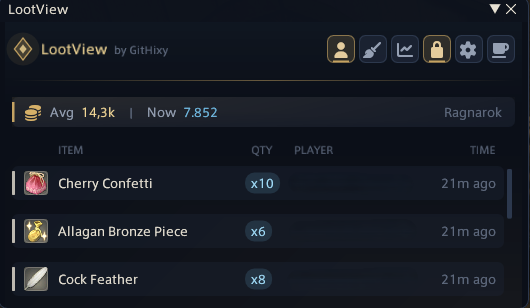
LootView is a live loot tracker for you and your party, with a permanent history and statistics behind it. WHAT YOU GET Works with every game language: English, Japanese, German and French. - Live overlay listing every drop with its icon, rarity, quantity, who received it and how long ago. - Estimated market value of your haul, priced for your home world through Universalis. - Currency drawer beside the overlay with every currency you hold, its cap and the weekly tomestone limit. - A banner on screen when another player commends you. - Need/Greed panel that appears while rolls are open: time left on every item, each Need, Greed and Pass, who is still deciding, and the winner. Roll Need, Greed or Pass right from the panel, with the game's own loot window kept out of the way. - Collectibles you already have (minions, mounts, orchestrion rolls, Triple Triad cards, emotes, hairstyles, portrait frames) are marked on their icon. - Detailed item tooltips with item level, jobs, stats, bonuses, materia slots and market price. - Loot tables for dungeons, trials and raids - the duty you are in, or any duty you search for. - Searchable history you can filter by item name, rarity, zone, high quality and owner. - Statistics: rarity breakdown, top zones, daily and hourly activity, play streaks and period-over-period comparisons. - Duty tracker recording your runs, clear times, items per run and personal bests. - Export to JSON or CSV whenever you want. GETTING STARTED Type /lv to open the tracker and /lv config for settings. You can also open it from the server info bar. Right-click any item to try it on, look it up, copy its name or blacklist it. Found a bug or have an idea? Settings > Diagnostics copies a report and opens a GitHub issue for you, or come and talk about it on Discord: https://discord.gg/9kjUjWDBkJ PRIVACY Your history is stored locally in your Dalamud configuration folder and is never uploaded. Market prices are looked up from universalis.app and loot tables from garlandtools.org; both requests send only an item or duty ID. Price lookups can be turned off in the settings.
Screenshots
1 image from the plugin's author. Click one to see it full size.
How to install
- Install XIVLauncher with Dalamud and start the game through it.
- Type
/xlpluginsto open the plugin installer. - Open All Plugins, search for LootView, and click Install.