
ProxyPlayer
Control what's playing on your computer within XIV!
About ProxyPlayer
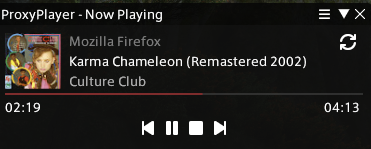
ProxyPlayer is a simple plugin that allows you to control your Windows or Linux* PC's media playback from within XIV. > * - Linux support is only supported on official XIVLauncher Wine builds and certain Wine/Proton builds with "AF_UNIX" support. Control your media player from within the game, without having to alt-tab or use a second monitor. Features (depending on your media player): - Play/Pause - Next/Previous Track - Stop - Progress Bar - Cover Art Display - Metadata ProxyPlayer comes with either a compact or portrait UI for displaying your media information.
Screenshots
2 images from the plugin's author. Click one to see it full size.

How to install
- Install XIVLauncher with Dalamud and start the game through it.
- Type
/xlpluginsto open the plugin installer. - Open All Plugins, search for ProxyPlayer, and click Install.
Similar plugins
-
 Orchestrion Plugin
Adds a simple front-end for browsing and changing the in-game BGM.
-
 Weatherman
Allows precise control over time and weather per zone or globally.
-
 Harp Hero
Bard performance assistant
-
 SoundSetter
A Dalamud plugin that allows volume control from anywhere, including gpose and cutscenes.